Chapter 5 -: Tender Document Download, Portal Navigation & Document Reading Workflow
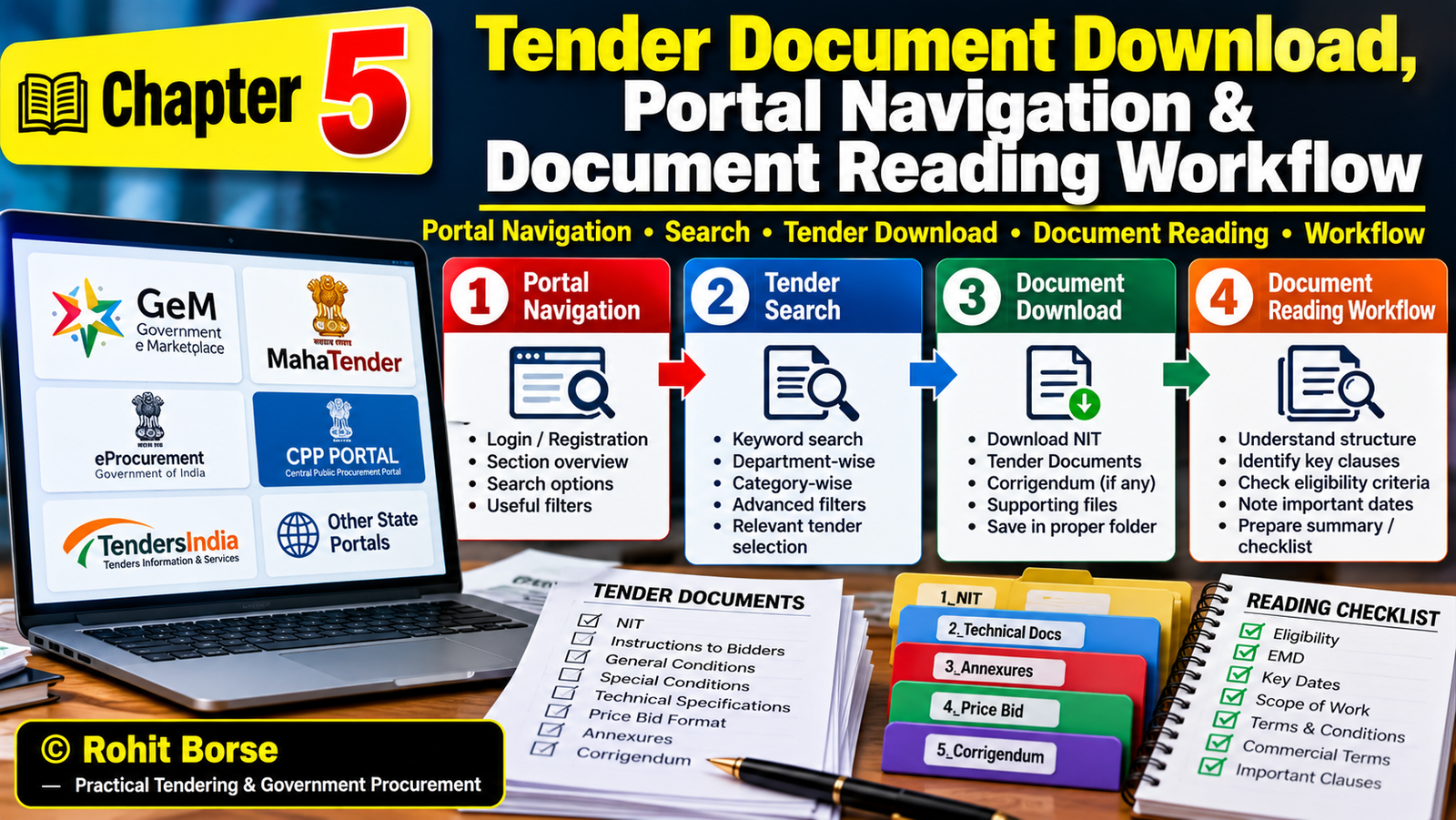
Tender search मध्ये योग्य opportunity सापडली की tendering process मधील पुढचा टप्पा सुरू होतो. Portal वर tender दिसणे म्हणजे tender समजणे नव्हे. Search result मधून योग्य tender उघडून त्याच्याशी संबंधित सर्व documents, dates, notices, corrigendum, BOQ, price bid आणि submission requirements एकत्रितपणे समजून घेणे ही स्वतंत्र working skill आहे. अनेक वेळा tender ची महत्त्वाची अट एका ठिकाणी नसते; काही माहिती portal च्या main page वर असते, काही NIT मध्ये, काही detailed tender document मध्ये, काही annexure मध्ये, काही BOQ मध्ये आणि काही corrigendum किंवा pre-bid clarification मध्ये येते. त्यामुळे Tender Executive ने एकाच document वर अवलंबून न राहता संपूर्ण tender record तयार करणे ही सुरुवातीची सवय लावली पाहिजे.
3.1 Tender Open केल्यानंतर सर्वप्रथम काय करायचे?
Portal वर relevant tender सापडल्यानंतर लगेच PDF download करून random reading सुरू करू नये. सर्वप्रथम tender ची identity confirm करावी. Tender ID / Tender Reference Number, Department / Organisation, Tender Title, Work Description, Tender Type, Publication Date, Bid Submission Start Date, Bid Submission End Date, Bid Opening Date, Estimated Tender Value, EMD, Tender Fee आणि applicable location यांसारख्या basic details प्रथम पाहाव्यात. यामुळे आपण योग्य tender उघडला आहे याची खात्री होते आणि पुढील document handling मध्ये दुसऱ्या tenderची माहिती चुकीने वापरली जाण्याची शक्यता कमी होते.
Tender Executive ने या stage ला एक साधा नियम ठेवावा—“Open → Identify → Confirm → Download → Read.” थेट “Open → Read” केल्यास document मोठा असल्यामुळे basic identity किंवा critical dates लक्षातून जाऊ शकतात.
3.2 Portal वरची माहिती आणि Tender Document वेगवेगळे का पाहायचे?
Tender portal वर दिसणारी information आणि downloadable tender document यांचा purpose वेगळा असू शकतो. Portal वर closing date, tender ID, organisation, EMD किंवा basic information दिसू शकते; तर detailed document मध्ये eligibility, scope, technical specifications, submission conditions, execution obligations आणि contractual terms असू शकतात.
म्हणून portal वर दिसणाऱ्या information ला summary / control information आणि tender documentsना detailed source information म्हणून पाहणे अधिक सुरक्षित ठरते. एखाद्या माहितीबाबत doubt निर्माण झाल्यास संबंधित tender document, corrigendum किंवा department communication तपासणे आवश्यक आहे. फक्त search result किंवा portal summary पाहून final interpretation करू नये.
3.3 Tender Documents ची पूर्ण यादी आधी ओळखणे
Tender उघडल्यानंतर documents section मध्ये उपलब्ध असलेल्या सर्व files एकदा scan कराव्यात. प्रत्येक file लगेच खोलवर वाचण्याची गरज नसते; पण “या tender शी संबंधित किती documents आहेत?” हे प्रथम समजले पाहिजे.
सामान्यतः Tender Notice / NIT, Detailed Tender Document / RFP, Scope of Work, Technical Specifications, BOQ, Price Bid format, Annexures, Forms, Declarations, Corrigendum, Pre-Bid Meeting Notice, Pre-Bid Clarification, Addendum किंवा इतर departmental communications अशा विविध files असू शकतात. प्रत्येक tender मध्ये ही सर्व documents असतीलच असे नाही आणि काही portals वर त्यांची naming वेगळी असू शकते.
म्हणून Tender Executive ने document च्या नावावरूनच त्याचा पूर्ण legal किंवा technical meaning ठरवू नये. Document title हा त्याच्या content कडे जाण्याचा मार्ग आहे; final understanding content वाचल्यानंतरच होते.
3.4 Tender Notice / NIT चे महत्त्व
Tender Notice किंवा NIT म्हणजे अनेक वेळा tender ची प्राथमिक ओळख करून देणारा document असतो. त्यामध्ये department, work, tender reference, important dates, estimated value, EMD, tender fee, eligibility ची basic information किंवा submission-related instructions असू शकतात.
हा document पूर्ण tender document चा substitute नाही. मात्र Tender Executive साठी तो पहिला orientation document म्हणून उपयोगी ठरतो. Tender काय आहे, कोणत्या department ने काढला आहे, कोणत्या कामासाठी आहे आणि basic commercial parameters काय आहेत याची प्राथमिक कल्पना यामधून येते.
3.5 Detailed Tender Document / RFP वाचण्याची तयारी
Detailed tender document मोठा असल्यास सुरुवातीपासून प्रत्येक शब्द line-by-line वाचणे practical नसू शकते. त्यामुळे प्रथम document ची रचना समजून घ्यावी. Contents page, section headings, clauses, annexures आणि schedules पाहावेत. त्यानंतर आपल्या tender analysis साठी महत्त्वाच्या भागांकडे focused reading करावी.
याचा अर्थ document मधील बाकीचे भाग वाचायचे नाहीत असा नाही. उलट पूर्ण document समजून घेणे आवश्यक आहे, परंतु reading ला structure असणे आवश्यक आहे. Tender Executive ने document ला एक मोठा PDF म्हणून न पाहता अनेक functional sections मध्ये विभाजित करून पाहावे.
3.6 Tender Document मध्ये माहिती शोधण्यासाठी PDF Search चा वापर
मोठ्या tender document मध्ये एखादा specific शब्द शोधण्यासाठी PDF च्या Find / Search function चा वापर करणे अत्यंत उपयुक्त आहे. उदाहरणार्थ EMD, Eligibility, Experience, Turnover, Pre-Bid, Hard Copy, Security Deposit, Performance Security, Office, GST, PF, ESIC, Penalty, Agreement, Payment, Manpower, Scope, Corrigendum अशा शब्दांचा शोध घेता येतो.
परंतु Find function चा वापर म्हणजे document वाचण्याचा substitute नाही. Search ने clause सापडला की त्याच्या आसपासचा पूर्ण context वाचणे आवश्यक आहे. फक्त एक sentence वाचून requirement समजल्यास interpretation चुकीचे होऊ शकते.
उदाहरणार्थ document मध्ये “Experience” हा शब्द अनेक ठिकाणी येऊ शकतो. एक ठिकाणी eligibility experience, दुसऱ्या ठिकाणी execution experience, तिसऱ्या ठिकाणी staff experience आणि चौथ्या ठिकाणी past performance संदर्भ असू शकतो. त्यामुळे keyword search नंतर clause + sub-clause + related condition वाचणे आवश्यक आहे.
3.7 Tender Reading मध्ये “Important Words” ओळखण्याची सवय
Tender document वाचताना काही शब्द किंवा phrases दिसले की त्यांच्याकडे विशेष लक्ष द्यावे. उदाहरणार्थ “shall”, “must”, “mandatory”, “compulsory”, “only”, “not eligible”, “liable to be rejected”, “within”, “before”, “after”, “minimum”, “maximum”, “subject to”, “as per format”, “failing which” अशा शब्दांमधून requirement ची seriousness समजू शकते.
प्रत्येक “shall” म्हणजे automatic disqualification आहे असे म्हणणे योग्य नाही; त्याचा context पाहावा लागतो. पण अशा drafting language ला casually वाचणेही योग्य नाही. Tender Executive ने अशा शब्दांभोवतीचे clauses mark करून ठेवले तर पुढील eligibility आणि compliance analysis अधिक अचूक होते.
3.8 BOQ आणि Price Bid वेगळ्या नजरेने पाहणे
BOQ किंवा Price Bid उपलब्ध असल्यास त्याकडे technical document सारखे पाहू नये. त्यामध्ये quantity, item description, unit, rate structure, taxes किंवा other financial fields असू शकतात. Tender मध्ये rate कशा पद्धतीने quote करायचा आहे, कोणत्या field मध्ये rate भरायचा आहे आणि कोणत्या format मध्ये financial bid submit करायची आहे हे आधी समजून घ्यावे.
BOQ download करून फक्त rate भरायला ठेवणे ही चुकीची पद्धत आहे. त्याचा format, locked cells, formula, quantity, unit आणि instructions आधी तपासणे आवश्यक आहे. Financial bid च्या चुकीच्या format मुळे technical eligibility पूर्ण असूनही submission-related problem निर्माण होऊ शकतो.
3.9 Annexures आणि Forms कधीच “फक्त formalities” समजू नयेत
Tender मध्ये दिलेले Annexures, declarations, undertakings, forms किंवा prescribed formats हे अनेक वेळा bidder कडून specific information किंवा acceptance घेण्यासाठी असतात. काही forms company letterhead वर, काही authorised signatory च्या signatureसह, काही affidavit स्वरूपात किंवा prescribed format मध्ये मागितलेले असू शकतात.
म्हणून प्रत्येक annexure साठी तीन प्रश्न विचारावेत:
हे भरायचे आहे का? कोणत्या format मध्ये भरायचे आहे? कोणाची signature / stamp / supporting document आवश्यक आहे?
हे स्पष्ट झाल्याशिवाय technical bid assembly करू नये.
3.10 Corrigendum आणि Revised Documents ची स्वतंत्र तपासणी
Tender download करताना documents section मध्ये Corrigendum / Amendment / Addendum / Revised Tender Document दिसत आहे का हे स्वतंत्रपणे तपासणे आवश्यक आहे. एकदा tender document download केले म्हणून original document final आहे असे समजू नये.
Corrigendum मुळे eligibility, scope, BOQ, dates, EMD, submission requirement किंवा technical condition बदलू शकते. त्यामुळे revised information असल्यास ती original document सोबत cross-check करावी. या chapter मध्ये corrigendum चे detailed legal/practical analysis पुन्हा करायचे नाही; ते आधी स्वतंत्रपणे घेतले आहे. येथे मुख्य मुद्दा एवढाच आहे की document collection stage वर corrigendum miss होऊ नये.
3.11 प्रत्येक downloaded file ला Tender Folder मध्ये सुरक्षित ठेवणे
Tender open केल्यानंतर documents वेगवेगळ्या random folders मध्ये save करू नयेत. Tender-specific folder तयार करून त्या tender शी संबंधित सर्व original downloaded documents त्यामध्ये ठेवावेत. Folder naming strategy आपण आधी ठरवलेल्या system प्रमाणे Tender ID + Department + Short Work Description अशा logical structure मध्ये ठेवता येते.
याचा फायदा असा की काही महिन्यांनी किंवा वर्षांनी tender पुन्हा उघडला तरी “हा कोणता tender होता?” यासाठी वेगळे research करावे लागत नाही. Tender ID, department आणि work description folder name मध्येच दिसते.
3.12 Original Downloads आणि Working Files वेगळे ठेवणे
Document control मध्ये एक सूक्ष्म पण महत्त्वाची पद्धत म्हणजे original downloaded files आणि आपल्या working files यांची distinction ठेवणे.
Department ने download करण्यासाठी दिलेला original PDF जसाच्या तसा सुरक्षित ठेवावा. त्यावर अनावश्यक editing, highlighting किंवा renaming करून original source खराब करू नये. त्याची working copy वेगळी ठेवता येते, जर detailed notes, highlighting किंवा internal analysis करायचा असेल.
यामुळे पुढे dispute, clarification किंवा clause verificationची गरज पडल्यास department कडून आलेली original file कोणती होती हे स्पष्ट राहते.
3.13 File Version Control
Tender document च्या नावात Final, Revised, Corrigendum-1, Corrigendum-2, Addendum, date किंवा version number असे references असू शकतात. त्यांना ignore करू नये.
उदाहरणार्थ एकाच tenderची तीन documents versions असतील तर फक्त Tender.pdf नावाने सर्व save केल्यास कोणती latest आहे हे समजणार नाही. त्यामुळे original departmental file name शक्यतो preserve करून आवश्यक असल्यास working copy ला internal naming द्यावी.
Latest document कोणता आहे हे स्पष्ट नसताना technical किंवा financial preparation सुरू करू नये.
3.14 Tender Reading Notes कसे तयार करायचे?
Tender वाचताना memory वर अवलंबून राहणे टाळावे. तुमच्या practical methodology प्रमाणे pen आणि notebook / digital notes हाताशी ठेवून reading करणे अधिक प्रभावी आहे. Tender ID, department, scope, eligibility, required documents, special conditions, clarification points, doubts, submission requirements आणि management discussion points यांची notes काढत जावी.
विशेषतः document वाचताना मनात येणारा प्रश्न लगेच लिहून ठेवावा. “हे compulsory आहे का?”, “यासाठी supporting document कोणता?”, “हा experience companyचा आहे की specific locationचा?”, “Hard copy कुठे submit करायची?”, “Pre-bid mandatory आहे का?” अशा प्रश्नांना पुढे शोधून answer करता येते.
यामुळे tender वाचताना एक महत्त्वाची गोष्ट घडते—reading passive राहत नाही; ती active analysis मध्ये बदलते.
3.15 “कुठे आहे?” हा प्रश्न नेहमी विचारावा
Tender document वाचताना फक्त “requirement काय आहे?” हा प्रश्न पुरेसा नाही. त्यासोबत “ही requirement document मध्ये नेमकी कुठे आहे?” हा प्रश्नही विचारला पाहिजे.
उदाहरणार्थ bidder office locationची अट Technical Bid section मध्ये नसेल, पण general conditions, eligibility clause, special conditions किंवा annexure मध्ये असू शकते. Hard copy requirement Technical Bid headingखाली नसून instructions to bidders मध्ये असू शकते. Pre-bid requirement notice किंवा separate communication मध्ये असू शकते.
म्हणून Tender Executive ने “हे Technical Bid मध्ये नाही म्हणजे requirement नाही” असा निष्कर्ष कधीही काढू नये.
3.16 Tender Reading म्हणजे Department च्या संपूर्ण अपेक्षांची reconstruction
Tender document वेगवेगळ्या clausesचा collection म्हणून न पाहता त्यातून departmentला प्रत्यक्षात कोणत्या प्रकारचा contractor हवा आहे हे समजून घेण्याचा प्रयत्न करावा. Scope काय आहे, किती manpower लागणार आहे, कोणते resources अपेक्षित आहेत, reporting structure काय आहे, timelines काय आहेत, compliance कोणाची आहे आणि contractorवर कोणत्या execution obligations आहेत—या सर्वांना एकत्रित केल्यावर tenderचे वास्तविक स्वरूप समोर येते.
याच कारणामुळे tender document reading हा फक्त eligibility documents collect करण्याचा process नाही. Tender document म्हणजे departmentच्या अपेक्षांचा written blueprint आहे. त्यातून पुढे costing, execution आणि pricing समजण्यास मदत होते.
3.17 Portal Information आणि Internal Notes यांचा संबंध
Portal वरून घेतलेली basic information आणि tender document मधून घेतलेली detailed information यांना internal notes मध्ये जोडले पाहिजे. उदाहरणार्थ closing date portal वर दिसते; पण hard copy requirement tender document मध्ये दिसते. EMD portal summary मध्ये दिसते; पण exemption किंवा specific submission condition tender documentमध्ये असू शकते.
म्हणून final tender understanding तयार करताना एकाच sourceवर अवलंबून न राहता portal + tender document + annexures + corrigendum + departmental clarification यांचा combined view घ्यावा.
3.18 Tender Reading मध्ये घाई का टाळावी?
Tender document पहिल्यांदा उघडल्यानंतर लगेच conclusion काढणे टाळावे. मोठ्या tender मध्ये एक clause दुसऱ्या clauseशी जोडलेला असू शकतो. Eligibility एका sectionमध्ये, supporting document दुसऱ्या sectionमध्ये आणि format annexureमध्ये असू शकतो. त्यामुळे एखादी अट पहिल्यांदा पाहून incomplete conclusion घेण्यापेक्षा clause शोधणे, surrounding context वाचणे आणि संबंधित section cross-check करणे अधिक सुरक्षित आहे.
तुमच्या practical working principle प्रमाणे, tender वाचताना शांत राहणे आणि आवश्यक तेवढे notes काढणे महत्त्वाचे आहे. Tendering मध्ये speed आवश्यक आहे; परंतु uncontrolled speed पेक्षा structured speed अधिक महत्त्वाची आहे.
3.19 Tender Document Reading चा Practical Workflow
एक experienced Tender Executive tender उघडल्यानंतर broadly असा workflow वापरू शकतो:
Portal वर Tender Open → Tender Identity Confirm → All Documents Scan → Documents Download → Original Files Secure → Corrigendum/Revision Check → Tender Notice/NIT Read → Detailed Tender Document Open → Contents/Sections Understand → Important Keywords Search → Scope/Eligibility/Submission Requirements Identify → BOQ/Price Bid Check → Annexures/Forms Identify → Questions/Doubts Note → Management/Clarification Points Mark → Detailed Tender Analysis कडे पुढे जाणे.
हा workflow mechanical checklist म्हणून नव्हे तर एक disciplined reading sequence म्हणून वापरावा.
3.20 Tender Reading पूर्ण झाल्याचे कसे समजेल?
Tender Executive ने tender reading पूर्ण केली आहे म्हणजे त्याने PDF शेवटपर्यंत scroll केला आहे असे नाही. Reading तेव्हा complete मानता येते जेव्हा त्याला tenderची basic identity, scope, eligibility structure, submission requirements, financial format, important dates, special conditions, supporting documents आणि unresolved questions यांची स्पष्ट picture तयार झालेली असते.
जर document बंद केल्यानंतरही “pre-bid compulsory होती का?”, “hard copy कुठे द्यायची?”, “BOQ कोणत्या formatमध्ये आहे?”, “कुठले documents mandatory आहेत?” असे मूलभूत प्रश्न अनुत्तरित असतील, तर tender reading अजून पूर्ण झालेली नाही.
3.21 Final Practical Principle
Tender Executive साठी एक अत्यंत महत्त्वाचा working principle असा असावा:
“Tender download करणे म्हणजे document मिळवणे; Tender reading म्हणजे requirement समजणे; आणि Tender analysis म्हणजे त्या requirementचा companyच्या eligibility, costing आणि execution capabilityशी संबंध जोडणे.”
ही तीन वेगवेगळी कामे आहेत. त्यांना एकच प्रक्रिया समजल्यास confusion निर्माण होतो. Search chapter मध्ये आपण opportunity शोधली. या chapter मध्ये आपण ती opportunity व्यवस्थित capture आणि understand केली. त्यानंतरच detailed analysis, costing, technical preparation आणि management decision यांना योग्य आधार मिळतो.
© Rohit Borse
— Practical Tendering & Government Procurement